A filter + cache case study — test6.mybench.net
Auto Sales is a car classifieds marketplace running on WordPress: Bricks Child Theme, WooCommerce-style listings, Advanced Custom Fields PRO, and two purpose-built plugins — Djia-filter and DJIA Cache. We built both to keep a fast, filterable catalog and a fast page cache working as one system.
1. The scale problem
The catalog holds 96,122 published listings across 4,807 admin pages, added continuously by several editors (Figure 1). At that volume, a standard WordPress tax_query/meta_query filter running through wp_ajax becomes the bottleneck. Every filter change scans a very large posts table. An ordinary page cache cannot help either, because a filtered result set is inherently dynamic. It only becomes a fixed URL when someone requests that exact combination of brand, location, year and fuel type.
The site needed two things working together. The first is a filtering system fast enough to feel instant across 96k rows. The second is a caching layer that understands the difference between static content and filtered AJAX responses. It also has to keep both in sync the moment a listing changes.
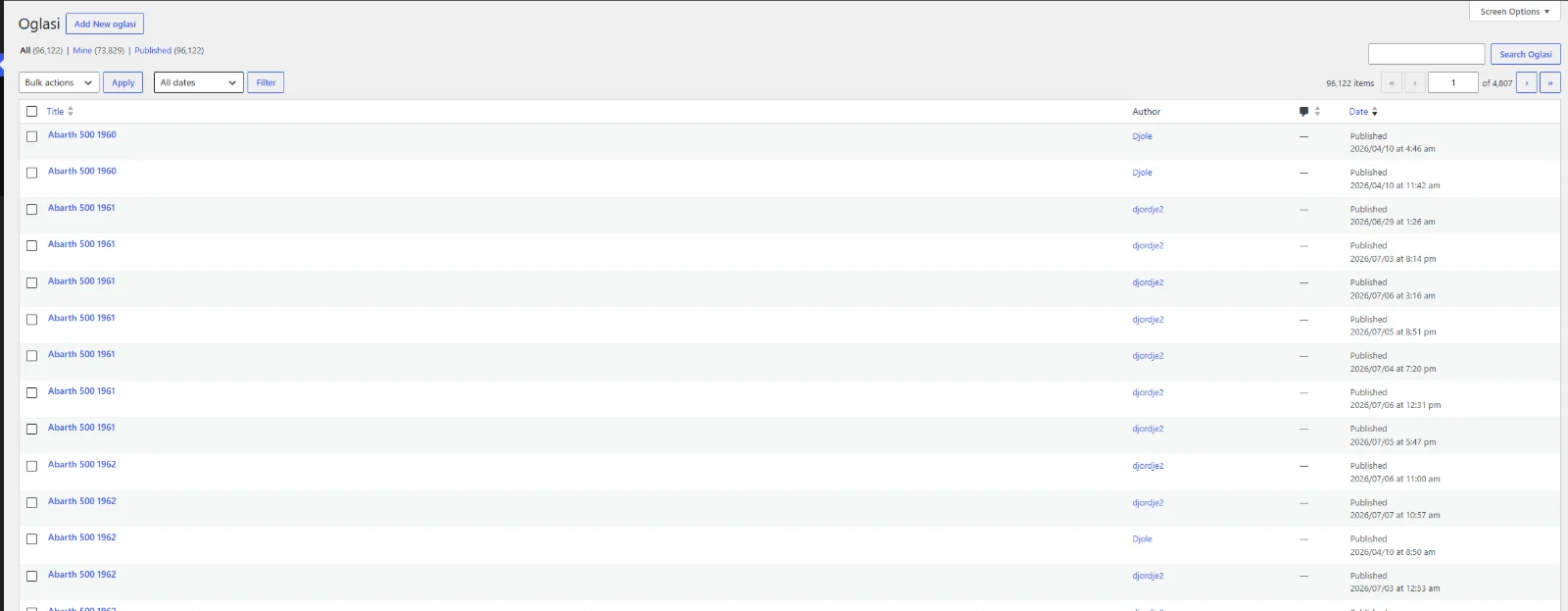
Figure 1. 96,122 published listings (“Oglasi”) across 4,807 pages in the admin.
2. The stack
The front end runs on a Bricks Child Theme on top of the Bricks visual builder (Figure 2). Advanced Custom Fields PRO models the listing data. In addition, a small in-house plugin, Demo Auto Generator, seeds the catalog with realistic demo listings. It works without AJAX, with fast image handling and direct mapping into the ACF fields. That is how we built a 96k-row test catalog in the first place.
Two plugins carry the rest of this case study: DJIA Cache 1.2.9 and Djia-filter 1.25 (Figure 3). Techoli Company develops both. Its own listing describes Djia-filter as an AJAX filter system for query loops. It supports Bricks Builder, Elementor, Beaver Builder, Gutenberg and Flatsome, with shortcode-based filters, indexing, multi-layer cache and conditional logic. In other words, it is the filtering half of the same pairing DJIA Cache handles on the page-cache side.
Pricing:Djia-filter · DJIA Cache

Figure 2. Bricks Child Theme active on top of the Bricks visual builder.
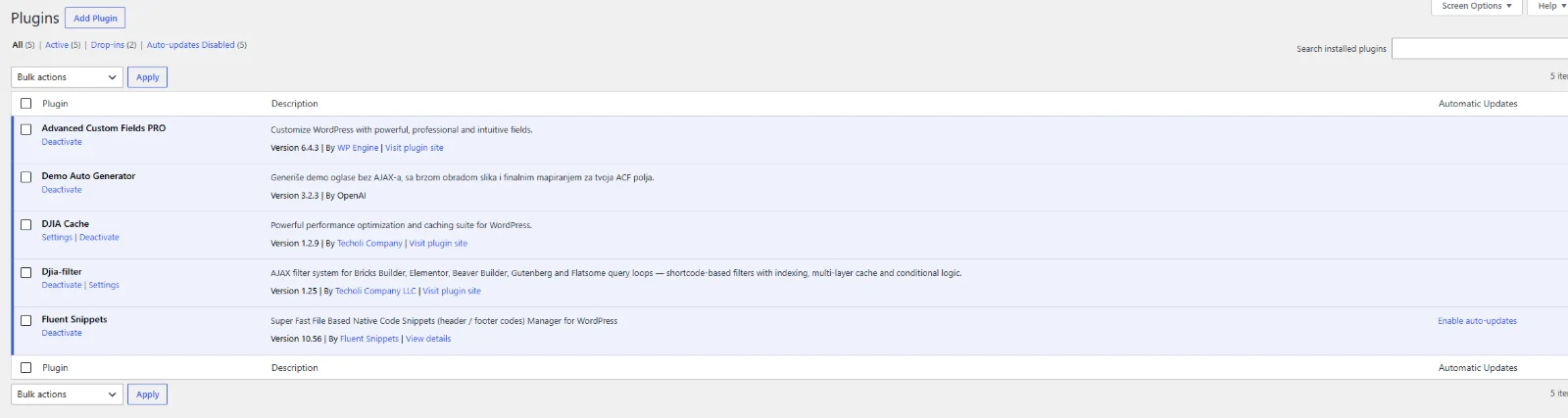
Figure 3. DJIA Cache 1.2.9 and Djia-filter 1.25, installed alongside ACF PRO and the Demo Auto Generator seeding plugin.
3. A pre-indexed filter system
Standard WordPress tax/meta queries do not scale to live filter UI at this row count. Djia-filter keeps its own pre-indexed lookup table instead. As of writing, it holds 1,057,234 index rows across all 96,122 indexed posts (Figure 4).
The plugin rebuilds that index incrementally rather than in one long pass. The Index Queue only reprocesses what actually changed (add, edit, trash or delete). It runs on a daily / partial schedule, in batches of 50 with a 20-second time budget per run. At screenshot time it had 80,085 rows done, 1,150 marked failed and queued for retry, and 0 pending. As a result, the live catalog keeps serving searchable, correct results while re-indexing happens quietly in the background. Therefore, there is no maintenance-window rebuild.
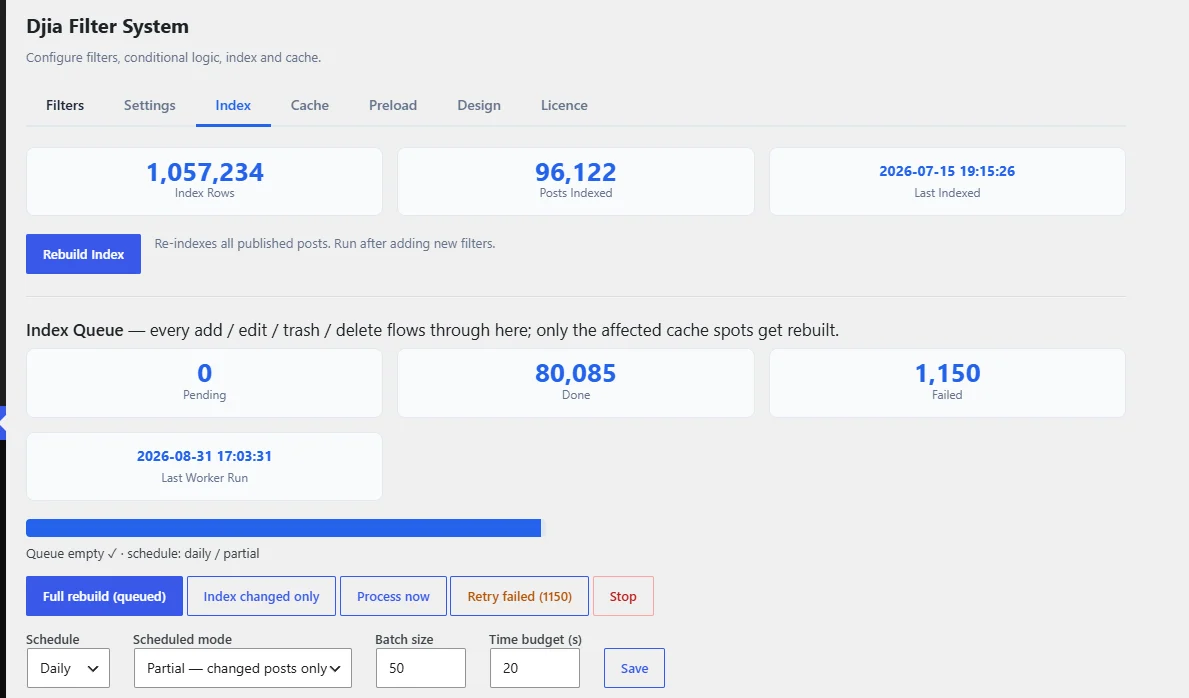
Figure 4. Djia-filter Index tab: 1,057,234 index rows across 96,122 posts, with a daily/partial rebuild queue.
4. Filter facets and shareable state
Each facet comes as a shortcode (Figure 5). Therefore, the same filter drops into a Bricks query loop, an Elementor loop grid, or any other supported builder. There is no need to rewrite logic per platform. On this site, the taxonomy facets are Marka Automobila (brand), Lokacija (location) and Godina (year). The meta-field facets are menjac (transmission), kubikaza (engine displacement), Hitno (urgent), Zamena (trade-in) and stanje (condition). In addition, there are reset, result count, pagination, per-page and sort controls.
Sync with URL and Browser History are both on. The address bar reflects an active filter combination, so anyone can share and bookmark it. Likewise, the browser’s back/forward buttons restore a previous filter state instead of triggering a fresh AJAX round trip.

Figure 5. Djia-filter shortcode-based facets: taxonomy, meta, pagination, sort and reset, all configurable per query loop.
5. Multi-layer filter cache and bot pre-warming
The plugin caches filter AJAX responses for anonymous visitors only (Figure 6). The Cache TTL is 5,270,400 seconds (about 61 days), with automatic purge on update. In addition, a 300ms debounce on the text search input stops a fast typist firing a request per keystroke.
On top of that response cache sits what the plugin calls Speed — Cache v2. First, Fast Serve (early) answers a matching cached filter request at plugin-load time, in roughly 100–200ms. That happens before the rest of WordPress boots. Second, Disk Cache mirrors those same responses to disk. The DJIA Cache drop-in can then serve them before WordPress loads at all, in roughly 20–80ms. This on-disk hand-off is the direct link between the two plugins. The plugin stores up to 20,000 distinct visitor filter combinations (“recipes”) and evicts the least popular first. Meanwhile, a background bot pre-warms them (Figures 6–7). It works within a 120-second time budget per batch and a 20-second timeout per replayed request.
A slow full-page fallback (1–3s) covers the rare case where a direct AJAX render fails. In addition, a lazy-image markup repair step fixes products that would otherwise show without images after filtering. Finally, an experimental prefetch-on-hover warms a result before the click even lands. As of writing, the Cache tab reports 1,009,855 total cache entries, all active (Figure 8). Of those, 39,800 sit mirrored on disk (432 MB). It also shows 124,969 bot recipes recorded and 23,072 still waiting for warm-up.
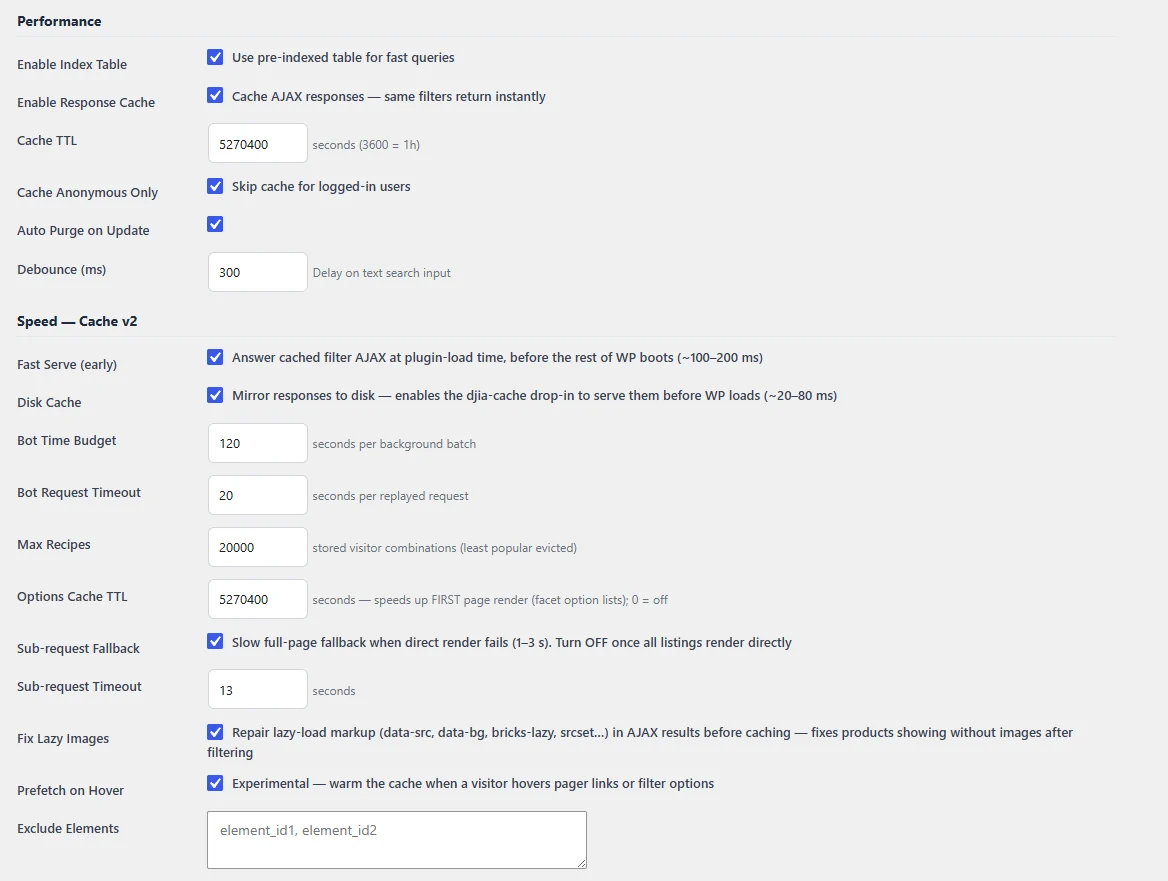
Figure 6. Response cache, Fast Serve and Disk Cache settings.
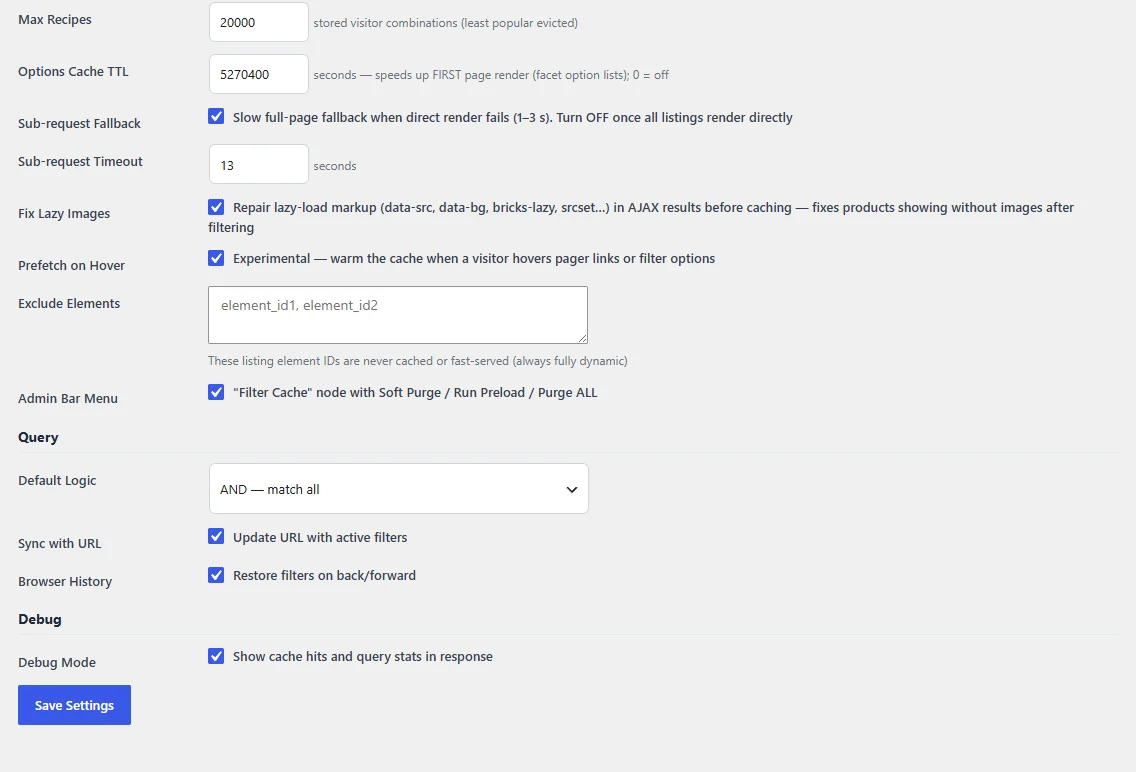
Figure 7. Bot pre-warming, lazy-image repair, prefetch-on-hover, and URL/history sync controls.
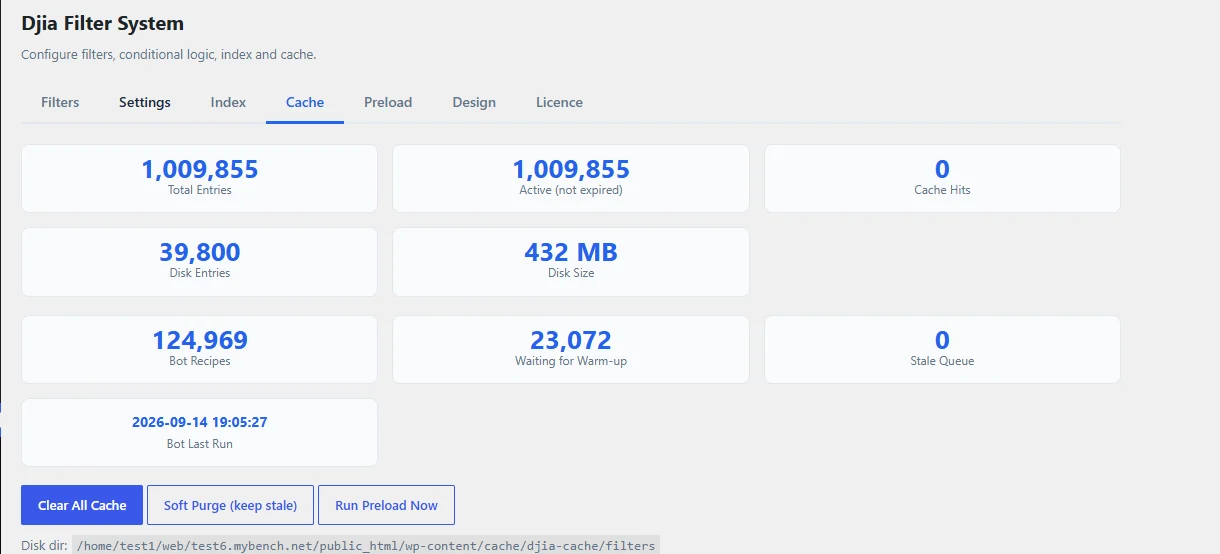
Figure 8. Cache tab: 1,009,855 total entries, 432 MB on disk, 124,969 bot recipes recorded.
6. Filtering in practice
Figure 9 captures a live filtering session against the 96k-row catalog. It narrows Marka Automobila to Acura, then Lokacija to Beograd, then the model to RDX and the sub-location to Barajevo. In the end, a single matching listing remains. Each of those steps is a separate admin-ajax.php round trip. Still, every single one in this session lands between roughly 46 ms and 278 ms. Even the slowest step stays well under a third of a second. That consistency, more than any single fast number, makes the filter feel instant rather than like a form submit. Nothing here depends on how many steps the visitor has already taken.
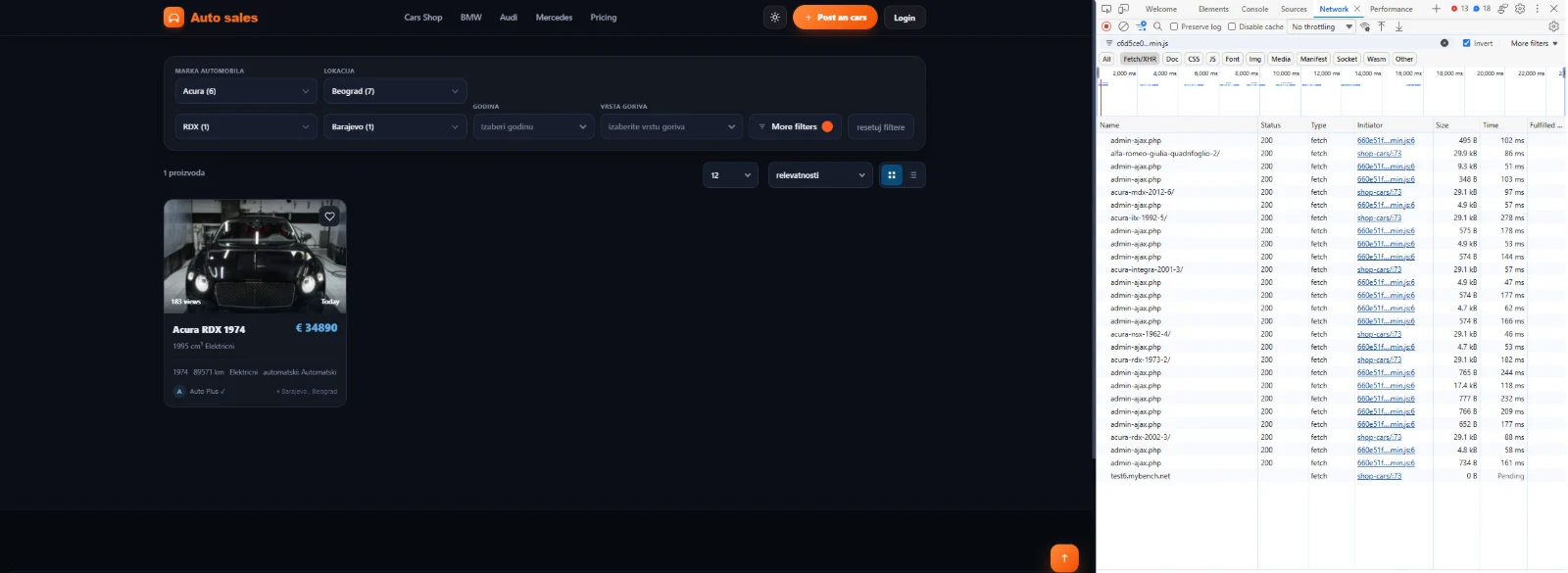
Figure 9. A four-step filter narrowing on the live catalog; every admin-ajax.php response stays under ~280 ms.
7. A page cache tuned for a 96,000-listing catalog
Disk usage matters far more once there are tens of thousands of cached pages. Therefore, Cache storage format on this site uses Gzip only (.html.gz). It does not store both a plain and a gzipped copy of every page. That takes roughly 5x less disk than the “Both” format, at gzip level 9. The server also sends files pre-compressed instead of compressing them at request time. Fast Path (server-level, no PHP) works the same way it would on a smaller site (Figure 10). It skips PHP entirely for eligible anonymous, default-language, query-string-free requests.
The setting unique to this pairing is Filter Fast Path. Normally, Djia-filter serves its own cached AJAX response from inside WordPress (~100–200 ms, as in Section 5). Instead, DJIA Cache’s drop-in now intercepts that same cached response and serves it straight from disk. As a result, WordPress does not load at all. The ~20–80 ms figure from Section 5 is this setting in action. Object Cache stays off here, unlike on a smaller storefront. Otherwise, it would layer a second caching mechanism on top of the filter plugin’s own multi-layer cache.
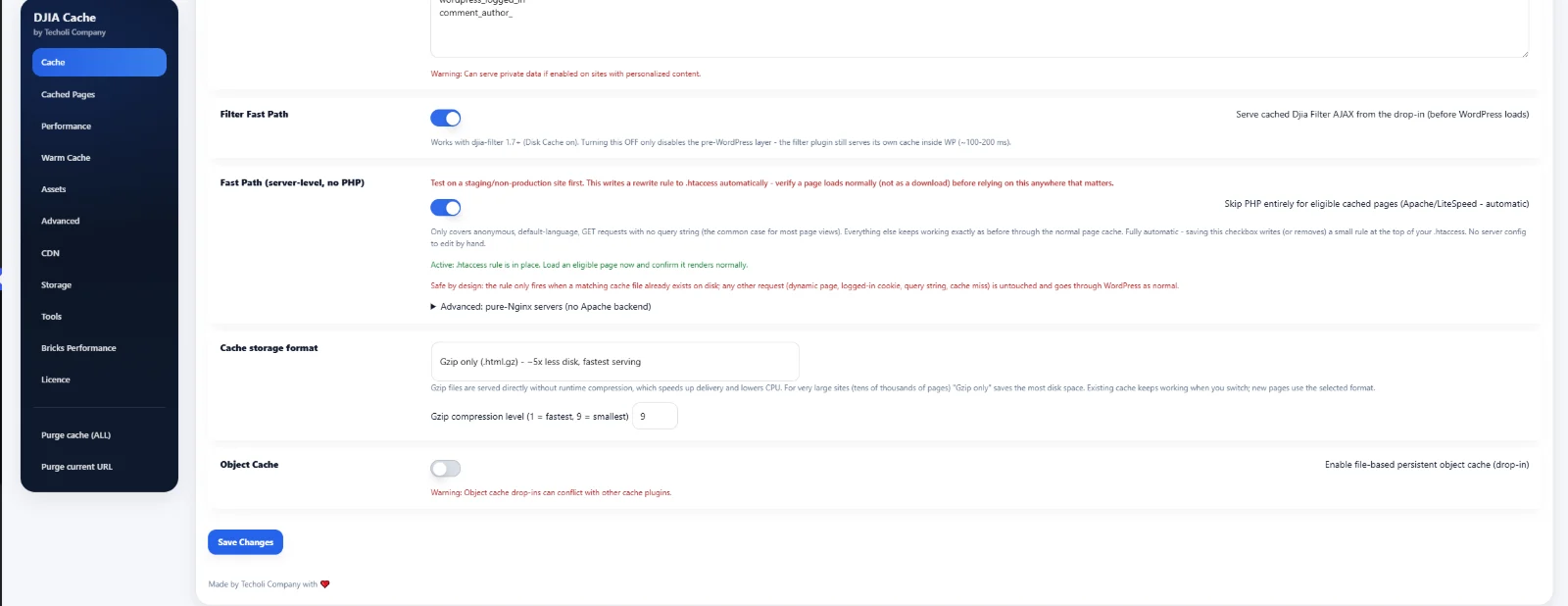
Figure 10. Filter Fast Path, server-level Fast Path, Gzip-only storage and Object Cache (left off) on DJIA Cache’s Advanced tab.
8. Keeping filter cache and page cache in sync on every update
This is the core problem the two plugins solve together. An ordinary page cache does not know that a price change should also invalidate every filtered view of that listing. On DJIA Cache’s Cache tab, “When content is updated, purge only that page (and its related archives)” is on, together with “…and immediately re-cache them with the new content.” We also registered the listing path /shop-cars/. As a result, its pagination and every cached ?filter variant purge in the background a few seconds after a save. WooCommerce purge & regenerate does the equivalent for the product URL plus shop/category/tag listings (Figure 11).
The plugin’s own activity log confirms this cross-plugin purge actually happens. The last recorded content purge cleared 3 exact URL cache files and purged 1 listing/filter page for a “Pricing” update. Therefore, a single product save reaches both the page cache and the filter plugin’s own cached AJAX responses. It does not stop at the one edited page. On the Djia-filter side, Auto Purge on Update (Section 5) works with the Index Queue’s changed-posts-only mode (Section 3). Together, they re-index a saved listing individually instead of triggering a full 96k-row rebuild. As a result, the pre-indexed table, the filter’s response cache and the page cache agree again within seconds. Meanwhile, the catalog never goes down for a rebuild.
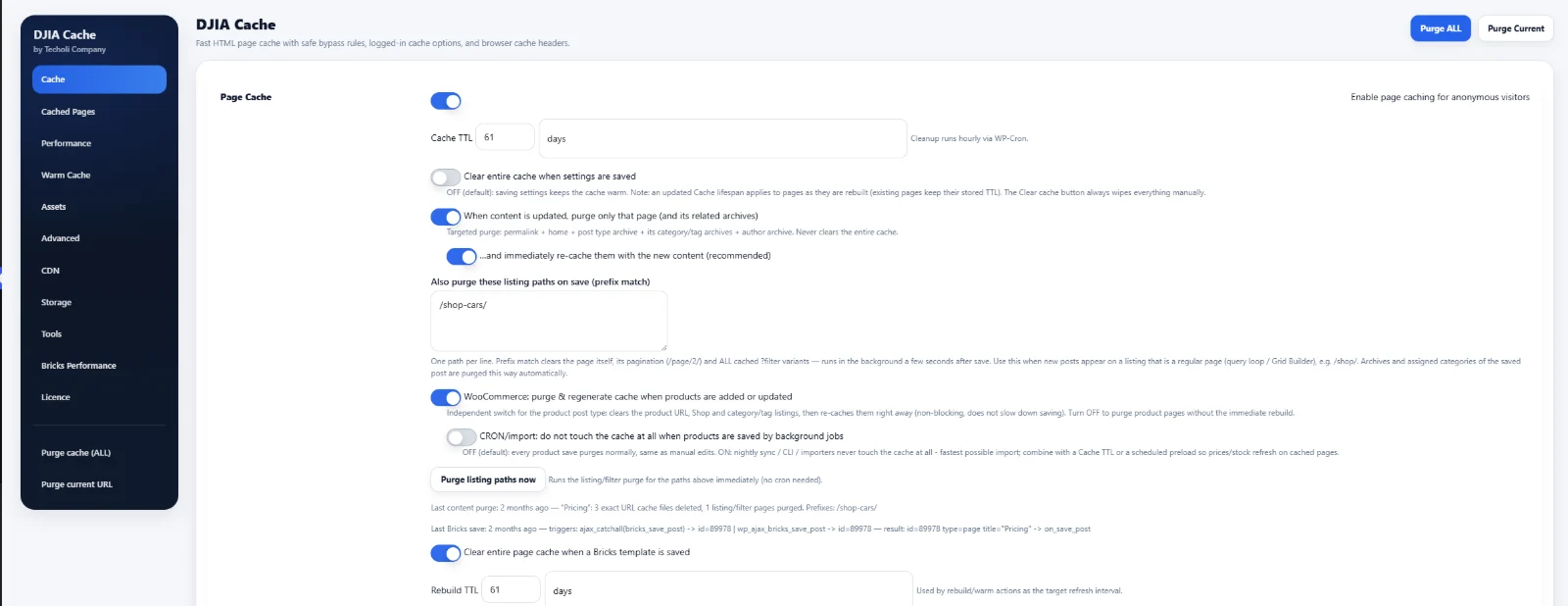
Figure 11. DJIA Cache purge-and-recache rules for /shop-cars/, with the activity log confirming a linked page + filter purge.
9. Other production safeguards
Logged-in caching is deliberately conservative. Page caching for logged-in users is off, User cache mode is Off, and the cache skips administrators entirely. Where a site does use a logged-in cache, it covers only specific roles (subscriber, customer) instead of every logged-in page. It also gets dedicated preload URLs (/, /my-account/) and preload sitemaps (sitemap_index.xml, category-sitemap.xml, post-sitemap.xml) (Figure 12).
Standard bypass rules still apply (Figure 13). The cache never stores /cart/, /checkout/, /my-account/, /korpa/ and /blagajna/. The same goes for query keys like add-to-cart, wc-ajax, preview and bricks, and for cookies matching wordpress_logged_in and comment_author_. It is the same safety net as on other DJIA Cache sites, present here despite the catalog’s scale.
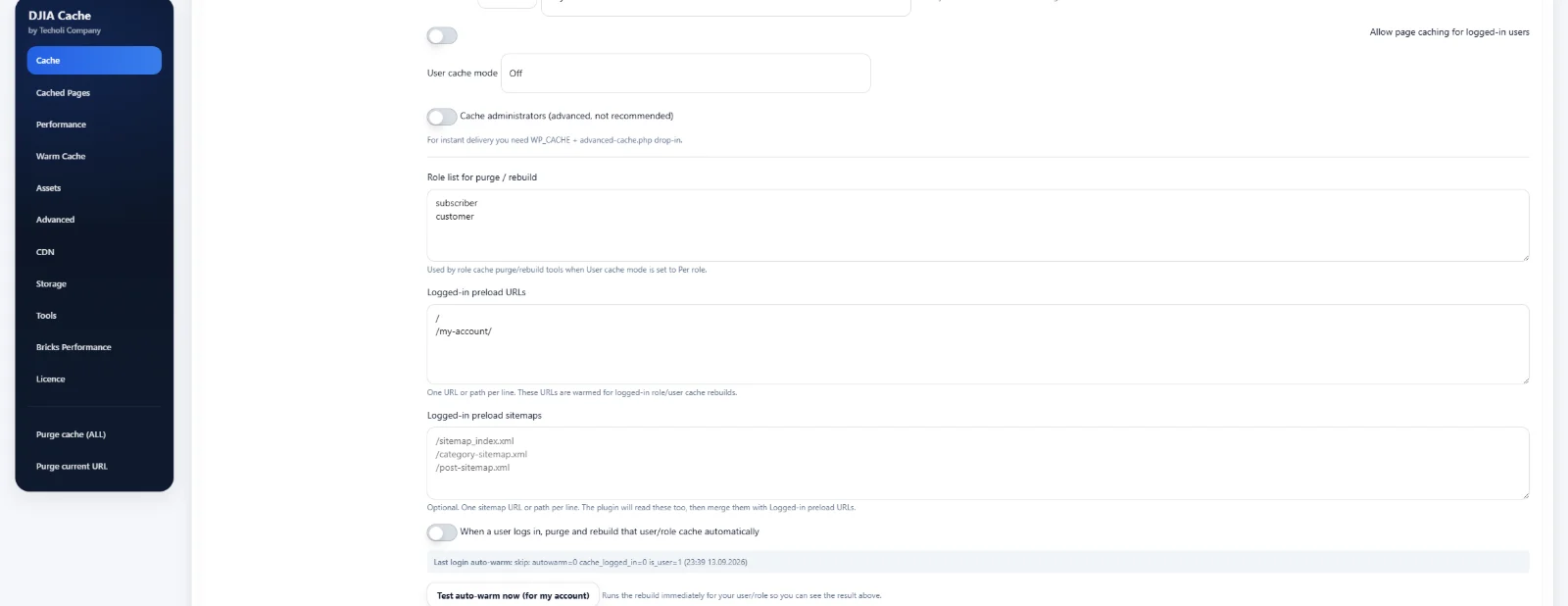
Figure 12. Per-role logged-in cache with dedicated preload URLs and sitemaps.
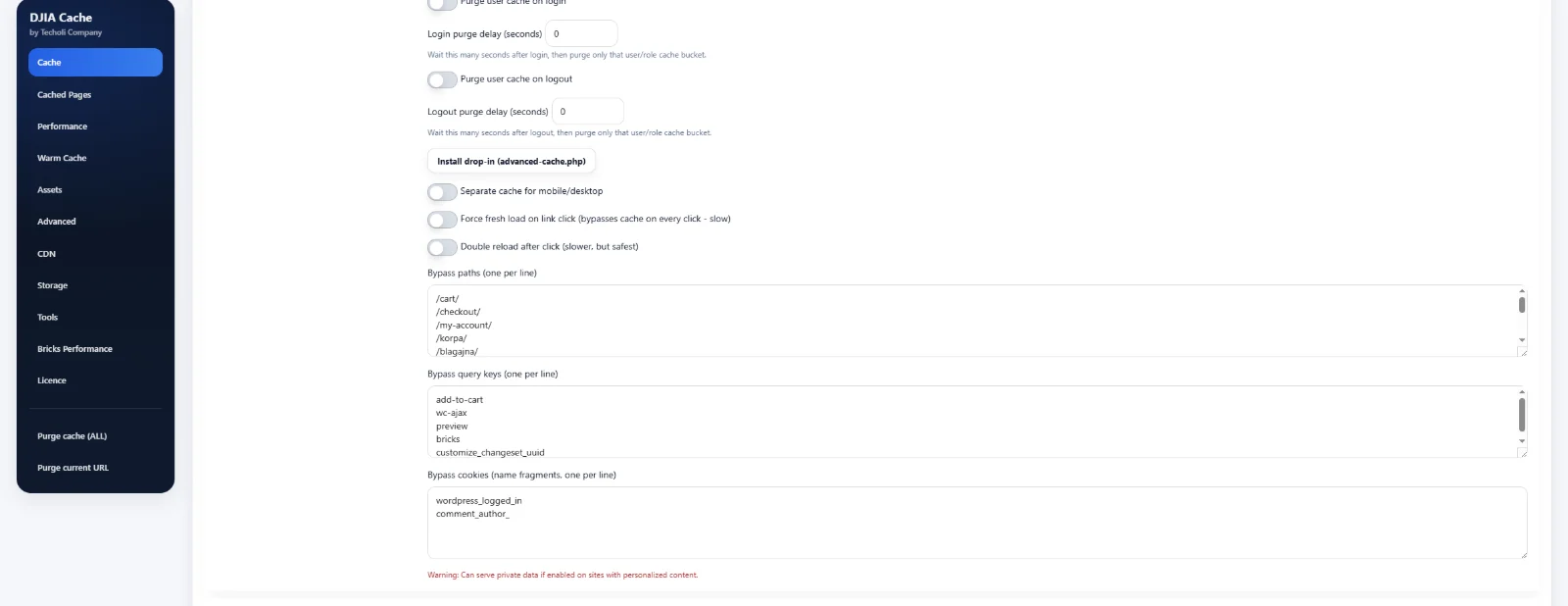
Figure 13. Bypass paths, query keys and cookies that always skip the cache.
10. Asset delivery at scale
Browsers cache static assets for 31,536,000 seconds (one year), with an immutable directive and auto-written .htaccess rules. In addition, the server applies gzip/deflate compression, and JavaScript Optimization defers enqueued scripts (Figure 14).
Combined CSS bundle is on here, although it stays off on a smaller storefront. The reason is that thousands of listing pages share the same archive and single-listing templates. Bundling local stylesheets into one content-hash-named file means every page using that template shares a single CSS download. As a result, no page pays for it per URL. The bundle excludes fonts.googleapis.com and fonts.gstatic.com. Meanwhile, the hourly cron cleans up stale bundle files automatically after 7 days (Figure 15). The filter’s own cache uses the same housekeeping mechanism.
All three minification switches (HTML, CSS, JS) are on, together with font-display: swap and self-hosted Google Fonts CSS. Finally, the site preloads the first font files (up to 3) to reduce invisible text on first paint (Figure 16).
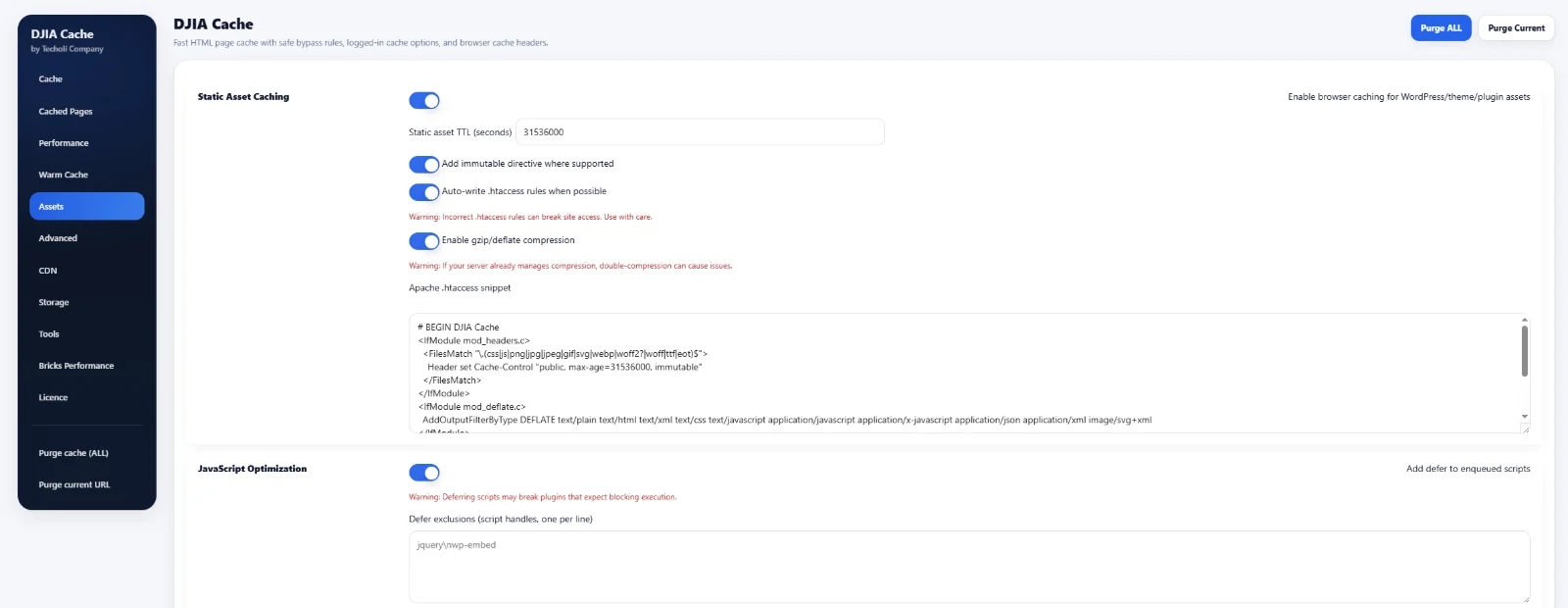
Figure 14. Static asset caching and JavaScript defer.
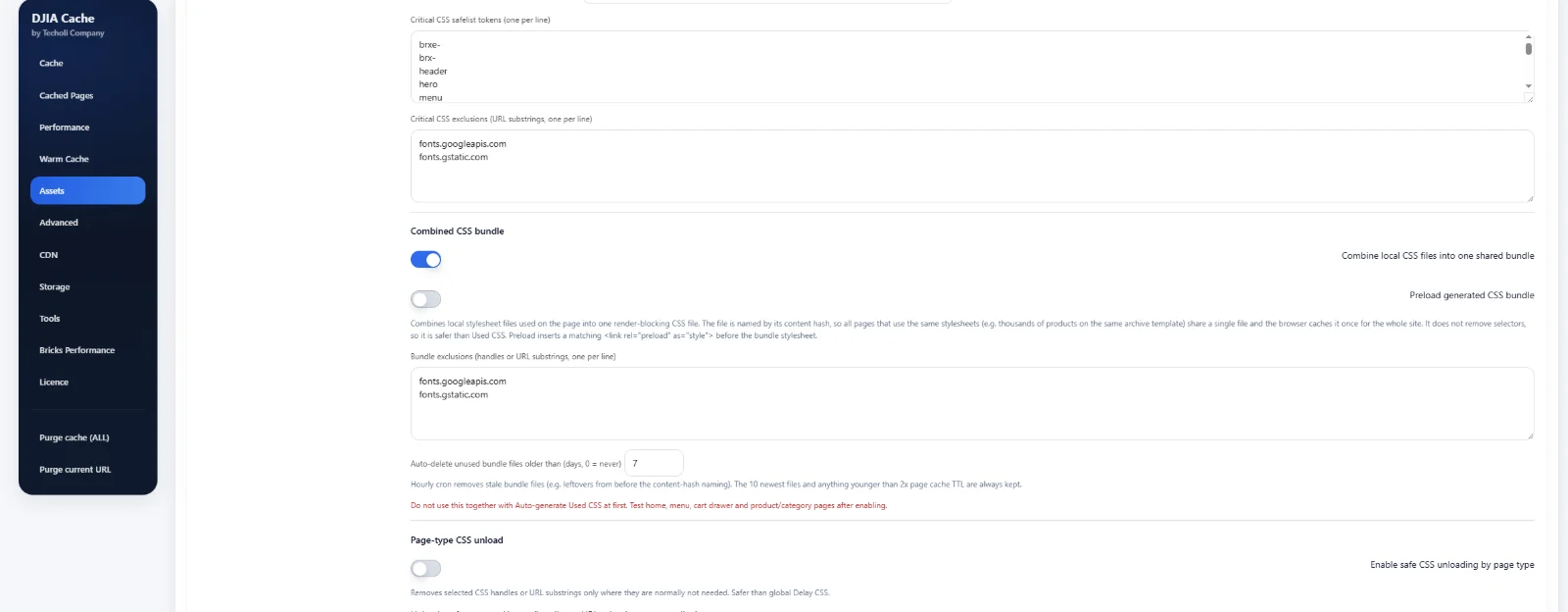
Figure 15. Combined CSS bundle, enabled here for a template shared across thousands of listings.
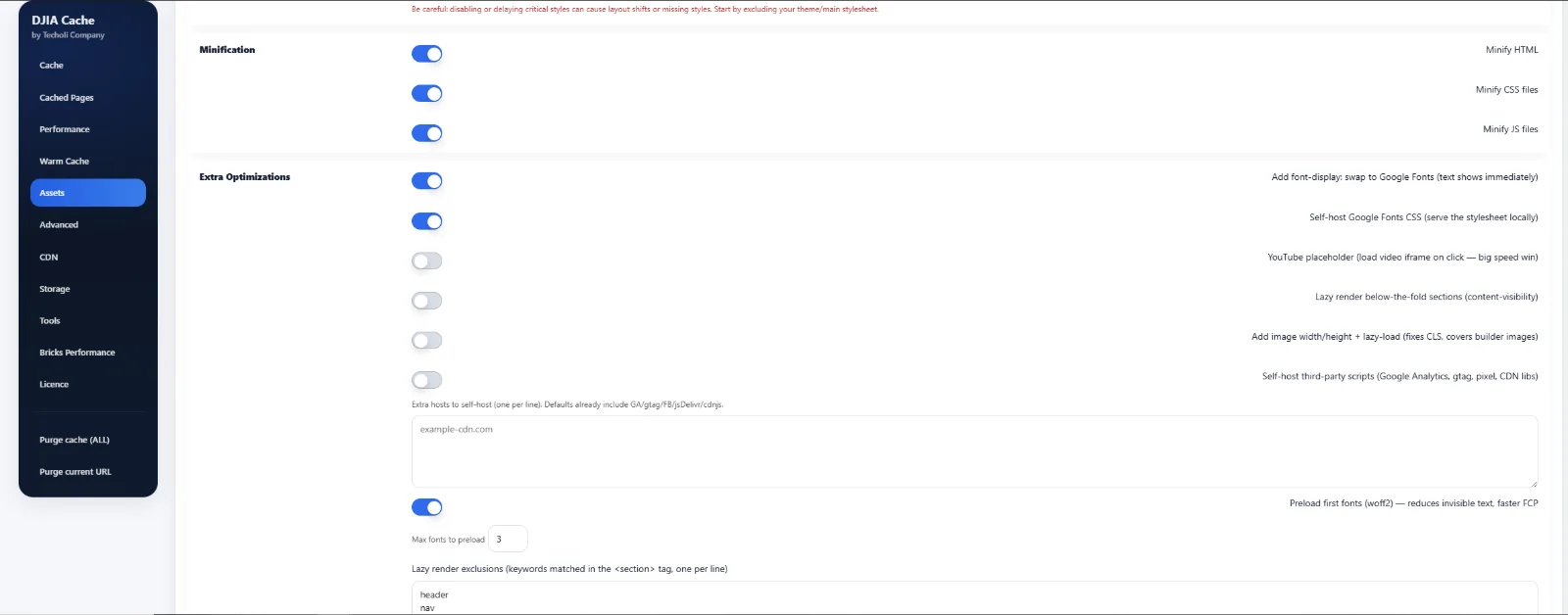
Figure 16. Minification and extra optimizations: font-display swap, self-hosted fonts, font preload.
11. Results
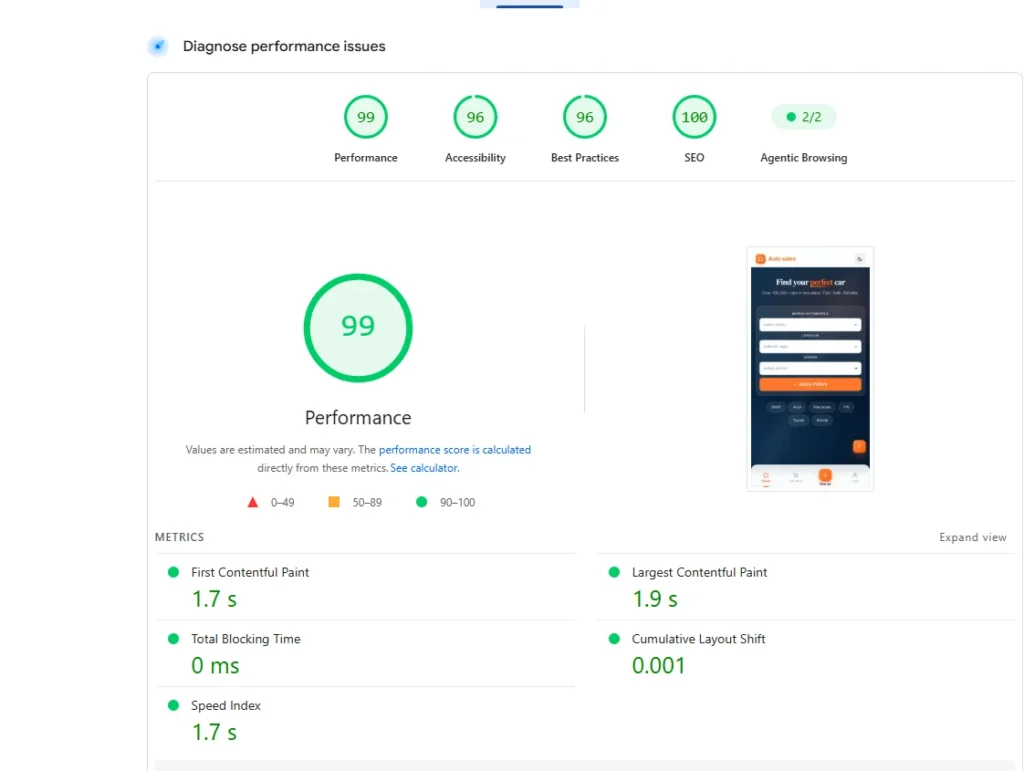
Mobile PageSpeed: Performance 99, Accessibility 96, Best Practices 96, SEO 100. First Contentful Paint 1.7 s, Largest Contentful Paint 1.9 s, Total Blocking Time 0 ms, Cumulative Layout Shift 0.001, Speed Index 1.7 s (Figure 17). These numbers come from a single-listing page on the same catalog and cache stack.
The shop listing itself holds 96,122 total products, with the first 10 shown per page. Still, the document becomes interactive almost immediately: DOMContentLoaded fires at 146 ms. From that point, a speculationrules prefetch document quietly pulls forward roughly a dozen likely next pages in the background. These include individual listings, /shop-cars/, /contact/, /pricing/, /faq/ and others. As a result, when a visitor actually clicks through, that page is often already sitting in the browser’s cache. Total network activity across all 42 requests finishes at 2.92 s, well after the page was already usable (Figure 18). That total covers the visible page plus everything prefetched behind it.
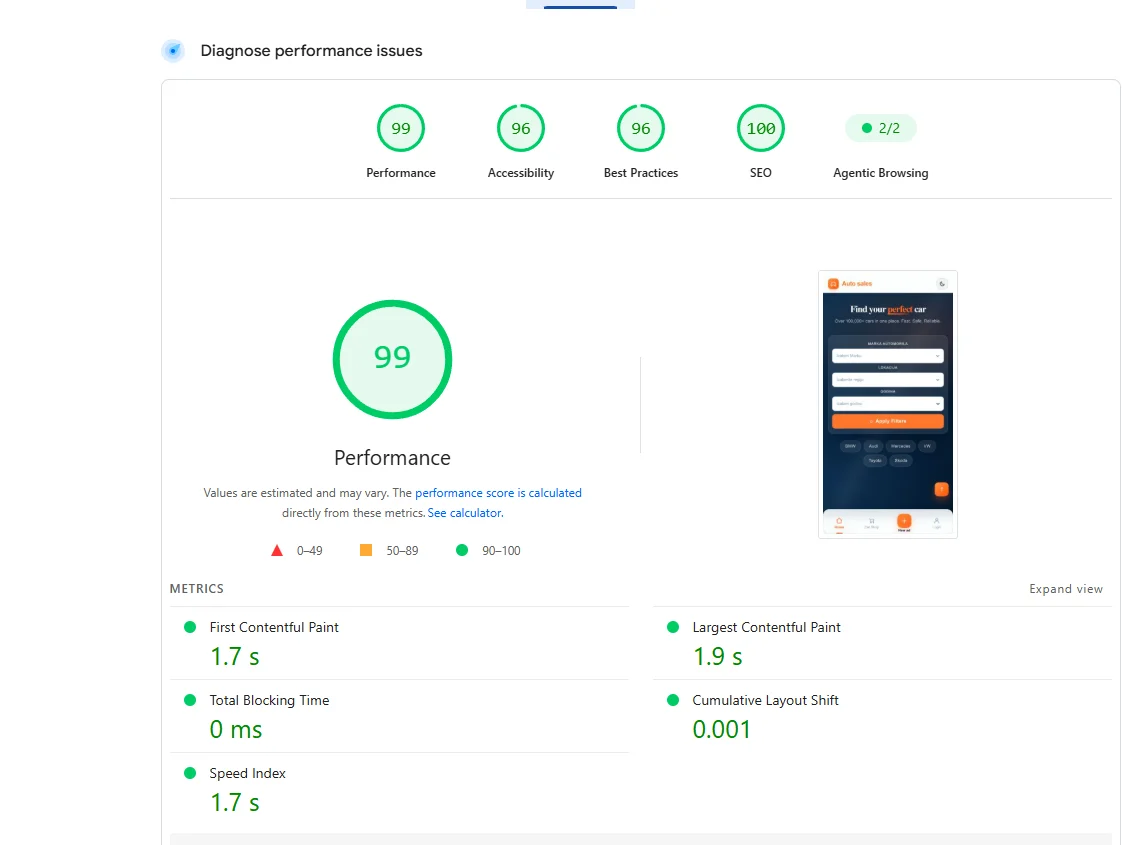
Figure 17. Mobile PageSpeed: 99 Performance, 96 Accessibility, 96 Best Practices, 100 SEO.
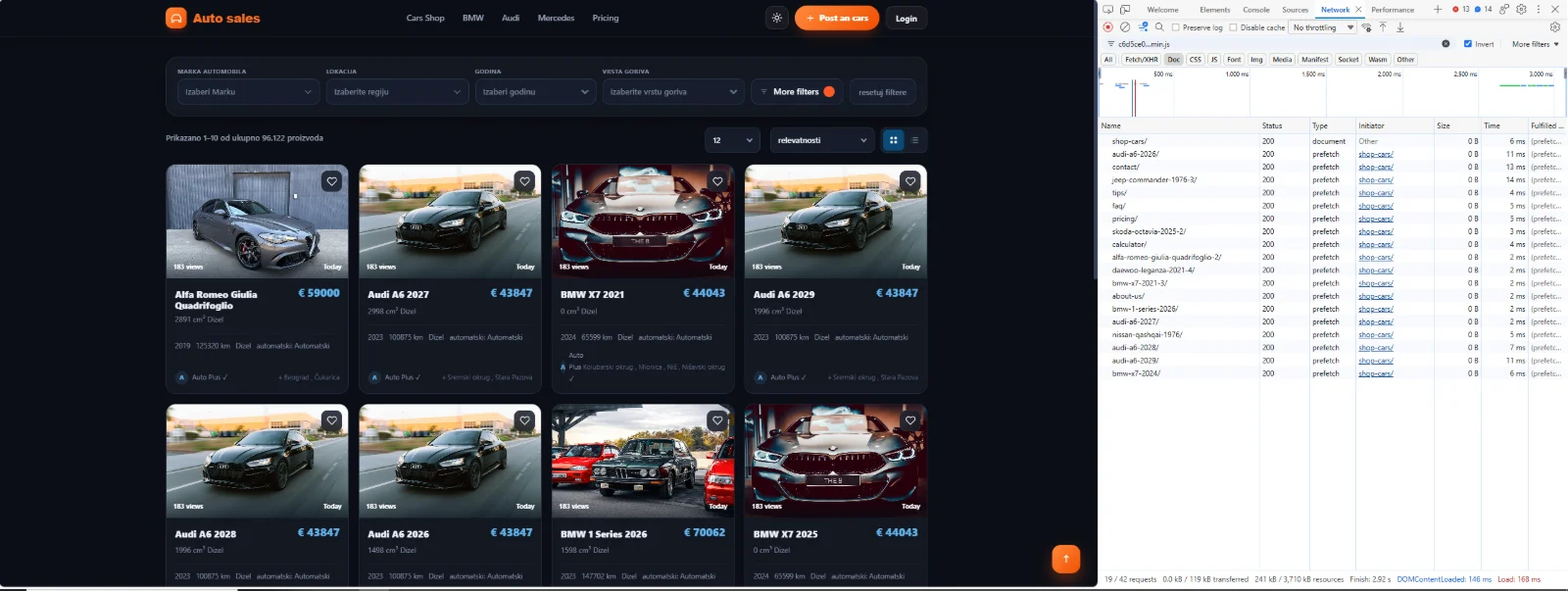
Figure 18. Shop listing (96,122 products) becomes interactive at 146 ms; speculation-rules prefetch runs in the background.
12. A real browsing session: filters at 60–80 ms, pages at 10–20 ms
A recorded browsing session on the live catalog makes the numbers from Section 5 concrete. Filtering by brand and then by fuel type fires a sequence of admin-ajax.php requests (Figure 19). They land at 60 ms, 63 ms, 58 ms, 70 ms, 57 ms and 62 ms. That is squarely inside the 60–80 ms range of the Response Cache, Fast Serve and Disk Cache layers from Section 5. It holds even mid-session, after several filter changes in a row.
Page navigation at 10–20 ms
The same panel shows why page-to-page navigation feels even faster, at roughly 10–20 ms once a visitor actually clicks. Rows like shop-cars/, bmw-x7-2021-3/ and hyundai-tucson-2003-2/ are speculation-rules prefetches. The browser quietly pulls them into its own disk cache in the background. Each is visible here at 82–107 ms while it downloads. By the time a visitor clicks through, that page’s bytes are already sitting on their machine. Therefore, the click resolves as a cache read rather than a second round trip to the server. That is two disk caches working together. The first is DJIA Cache’s server-side disk cache from Section 7. The second is the visitor’s own browser disk cache, fed by prefetch. Each removes a different leg of the trip before the click ever happens.
Stacking five facets at once
The session also exercises the harder case: stacking five facets at once into a single combined URL (Figure 20). Those are fuel, transmission, urgent, trade-in and condition together. It is the same Sync with URL behavior from Section 4, just with five values instead of one. Still, it resolves with the same short loading transition as a single-facet change. Clearing every filter back to the full 96,122-listing catalog is just as fast. This is because the unfiltered catalog isn’t a special slow path — it’s simply another cached recipe (Sections 3 and 7).
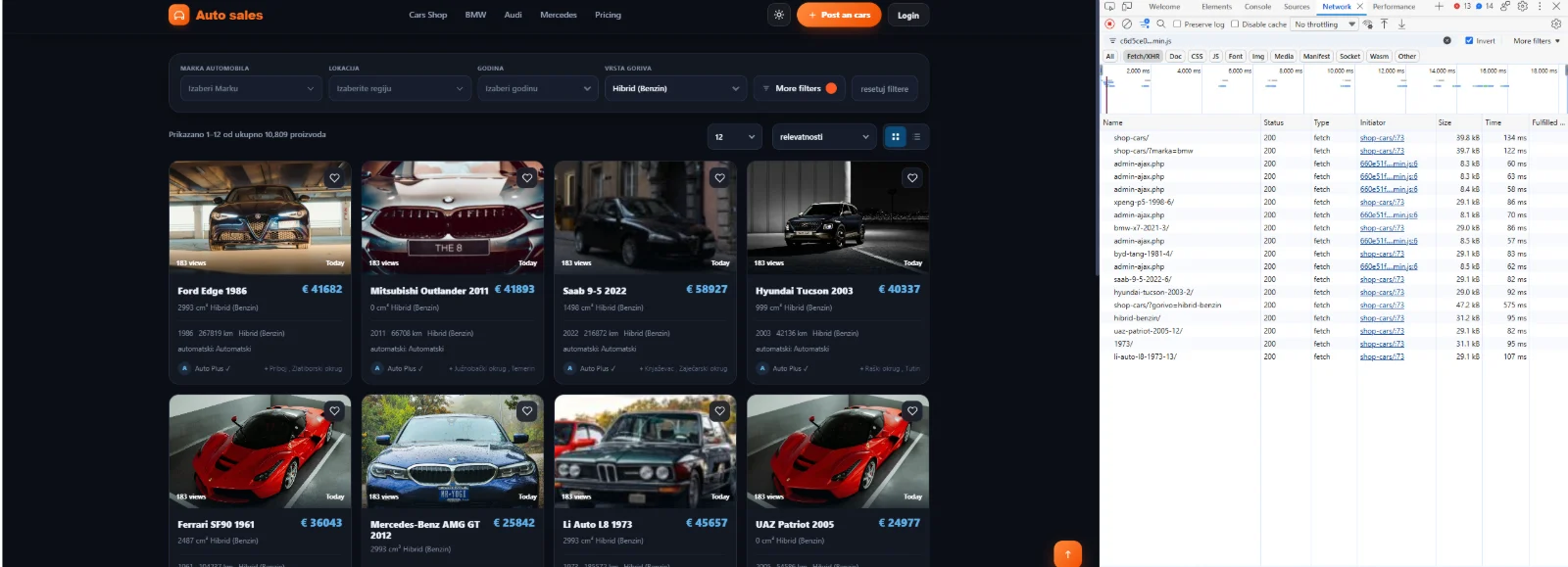
Figure 19. A live filtering session: admin-ajax.php filter responses at 57–70 ms, alongside speculation-rules page prefetches at 82–107 ms.

Figure 20. The “More filters” panel stacking transmission, engine size, trade-in, condition and urgent facets at once, live counts updating per option, result count already at 96,078.
Conclusion
None of the individual numbers in this case study is remarkable on its own. Those include sub-300ms filter responses, a 146ms DOMContentLoaded and a 99 mobile Performance score. What makes the system work at 96,000 listings is something else. The filter index, the filter’s own AJAX cache and the page cache are not three separate things. Instead, the same product save purges, rebuilds and re-warms them together, within seconds.
The broader lesson is that caching and filtering stop being separable concerns once a catalog crosses a certain size. A cache that doesn’t know about the filter index will serve stale filtered results. Likewise, a filter fast enough to feel instant is worthless if the page around it still takes seconds to render. We built both as one coordinated system: DJIA Cache and Djia-filter share a purge signal and a disk hand-off. That is what let this catalog scale to 96,000 listings without the usual trade-off between freshness and speed.
Pricing:Djia-filter · DJIA Cache